Capability 01
Convenient Filtering
Teamboard has task filters to quickly find what you need.
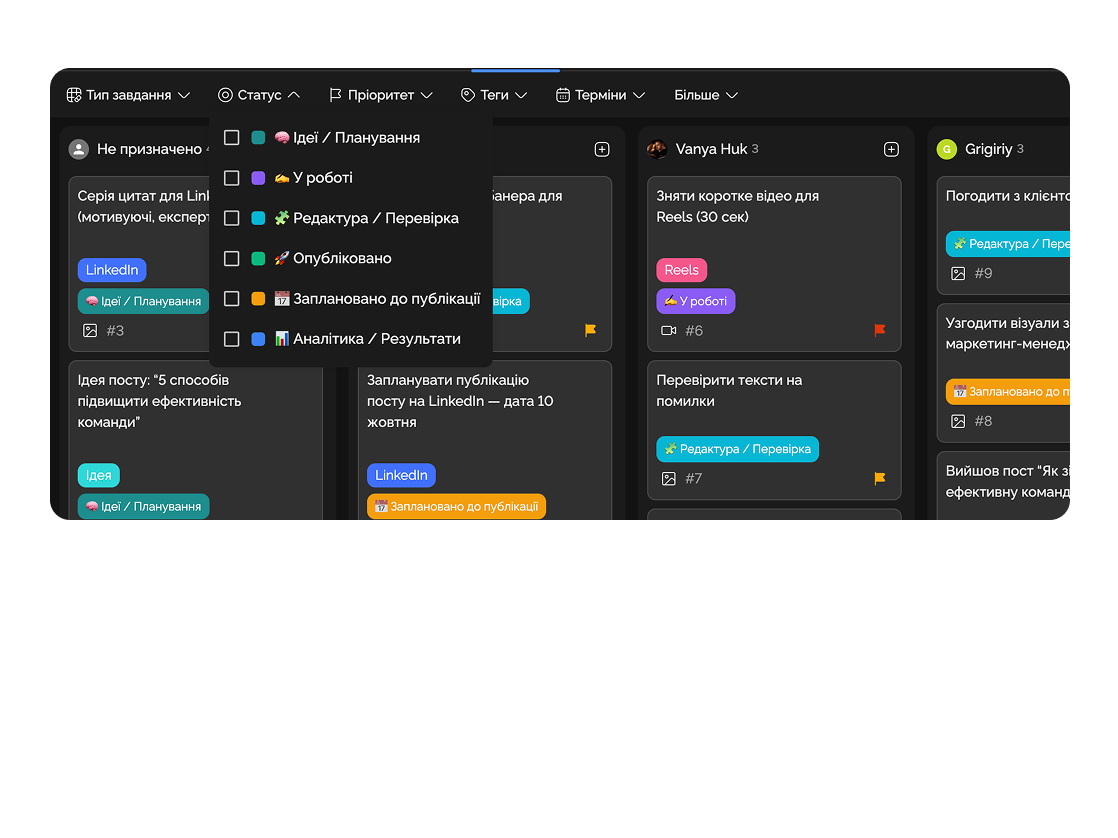
A single place where the entire team, their roles, tasks, and work progress are gathered.
Built for
Update API documentation
Prepare client presentation
Set up production monitoring
Checkout: validation error on empty ZIP
Stripe webhook: add retries with backoff
Hero section: final visual with new gradient
E2E test on checkout flow
By the numbers
100%
load visibility
customer data
−2 hrs
on daily syncs
Easylim CRM
1
screen = full team
2025 survey
Control roles, access, and participant activity in a few clicks.
Capability 01
Teamboard has task filters to quickly find what you need.
Capability 02
Track activity, workload, and efficiency of team members.
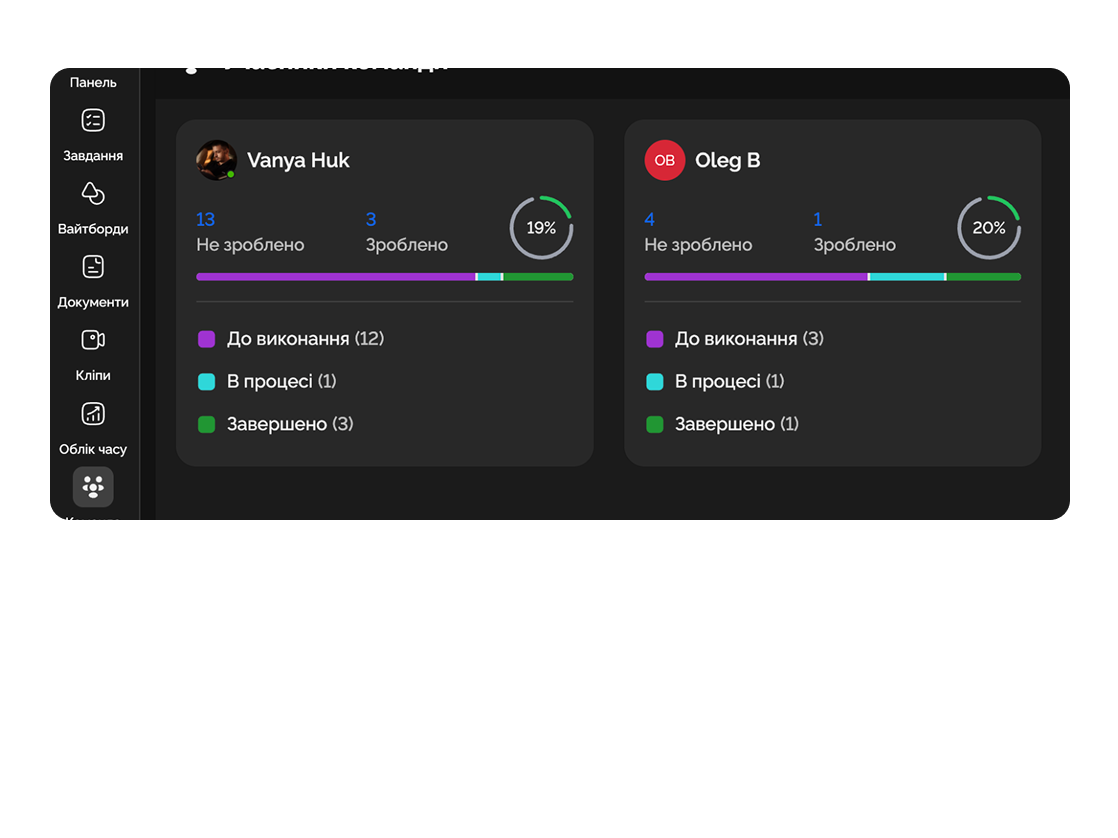
Founders see the full picture — who handles product, marketing, and finance.

Freelancers and employees from different cities work transparently, everyone sees their contribution to the overall result.

Deep dive
5 chapters
Kanban shows where a task is, but hides who's pulling it. In teams above 8 people that becomes a problem fast: a manager pings Slack with "who has bandwidth for an urgent fix?", gets three answers, picks the wrong person — and then finds out that person already had three things "in progress" with no clear due dates. Teamboard flips the lens from tasks to people: one column = one person, their cards = their tasks. Below: how to stand up a teamboard in 10 minutes, how to read load signals from it, and when this lens is the wrong tool entirely.
Розділ
A Kanban board is built around tasks: "where is this card?". Teamboard is built around people: "what's on this person's plate?". These are the same tasks, rotated 90 degrees — instead of columns "Backlog / In progress / Done" you get columns "Ivan / Alina / Peter", and each card sits in the column of its assignee.
Why it matters: in a 12-person engineering team, Kanban shows "28 tasks in progress", but it hides that 14 of them sit on one person. Teamboard exposes that asymmetry in 2 seconds — you can literally see whose column is short and whose runs off the screen.
A separate Unassigned column holds tasks without an owner. Treat it as your visual penalty bar: the longer something rots there, the longer the manager hasn't decided who owns it. A healthy team keeps Unassigned at 0-3 cards. If it's 20+, you're hoarding work instead of planning it.
Розділ
Create a team space, invite people by email (you can paste 12 emails at once, comma-separated). Each invitee automatically gets their own column on the teamboard — no manual setup.
Import existing tasks from your Kanban — or create new ones straight inside the teamboard (clicking "+" inside a person's column assigns to them on creation). For existing tasks you can drag from one column to another, and the assignee updates automatically, no "Edit task → Reassign" menu.
Set up status filters: "in progress only", "blocked only", "P0/P1 only". That stops people's columns from drowning in their backlog and shows what's actually happening right now. This is what makes teamboard a daily-standup tool instead of a weekly report.
showing · designers (3)
Розділ
Teamboard shows an active task counter in each column header. If one person has 9 and another has 4, that's not coincidence — it's a signal. Likely reasons: 1) someone forgot to say no and took on whatever came; 2) manager hands work to "the reliable one" by reflex; 3) someone is on vacation and their tasks weren't redistributed.
Rule of thumb: if the gap between the most-loaded and least-loaded person is ≥3 tasks, intervene. Not necessarily by reassigning — sometimes asking "Ivan, are all 14 actually active, or are 5 waiting on something?" is enough. Often half flip to "Waiting" status and the column shrinks without anyone moving a card.
The "84% capacity" footer indicator aggregates the whole team: total active tasks vs declared capacity (e.g. 2 tasks per person). If your team consistently runs at 110%, you're planning more than the team can deliver and deadlines will slip.
Розділ
Monday standup. Team opens teamboard, walks across people's columns left to right. Each person, 30 seconds: "I've got 6 active, P0 is webhooks, blocker is waiting on design feedback". The lead spots the asymmetry instantly: Alex has 9, Alina has 4.
Tuesday. Drag one of Alex's tasks into Alina's column. Assignee updates automatically, Alex gets a notification ("task moved to Alina"), Alina too. No "hey, can I dump this on you?" conversation in Slack — it already happened in the UI.
Wednesday. New task from the client lands in Unassigned. At the midweek planning, the lead drags it into Peter's column — he said he had bandwidth. Not in Slack, not in email — in the teamboard.
Thursday 1-1. Tech lead opens teamboard, filters to one person's column: "let's walk your 6 active items — anything you're stuck on?". A 1-1 with concrete content, not "how's it going?".
Friday retro. Look at how load distributed across the week. If one column was always longer, that's a signal for reassigning responsibilities, not for "work faster".
Alina K.
Designer
Ivan O.
Engineer
Maria V.
Content
Dan R.
Support
Розділ
If you have a team of 5 or fewer, teamboard is overkill. Kanban with standard statuses already shows who's on what — assignees are visible on cards. Kanban board + a "my tasks" filter covers the need.
If you care more about where the task is in the process (Backlog → Review → Done) than who's pulling it, teamboard is worse than Kanban. Don't swap one for the other; add teamboard as a second view on the same task set.
Management overview across many projects isn't teamboard, it's a dashboard with a "workload per assignee" widget. Dashboards aggregate numbers across projects, teamboard shows the detail inside one. Dependencies and deadlines (who's blocking whom, when something ships) → Gantt, not teamboard.
Larger teams often run all three: Kanban for daily work, teamboard for rebalancing and 1-1s, dashboard for management reviews. In Easylim it's the same task set, three views — no migration.
lens: HR · balance · 1-1s
lens: project · status · flow
who works → teamboard · where it is → kanban
This feature connects to the apps your team already lives in.
More features
No card required. Free tier forever.


